
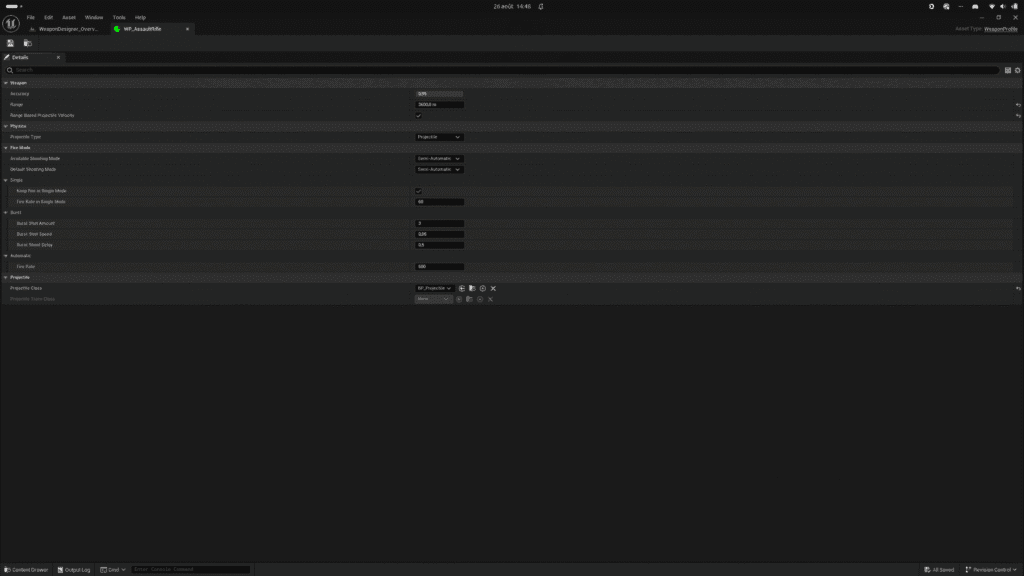
The Weapon Profile class is a data asset that contains important data regarding the weapon’s characteristics. You can create multiple profiles for the same weapon class and assign a different profile to each instance.
How to create? #
From the content browser, use the context menu (right-click) to select Weapon Profile from the Weapon Designer category. You can also create a data asset (Miscellaneous > Data Asset) and select the Weapon Profile class.
How to configure? #
- Edit weapon characteristic like Accuracy and Range.
- Select the projectile type. Physics based or line trace based.
- Setup the fire mode. Enable all fire mode you want for this weapon profile and select the default fire mode.
- Select the projectile class spawned by the weapon with this profile.
- Assign this profile on any Weapon Ranged class or instance.
Range based projectile velocity #
By default, the projectile has a launch velocity specified in the Weapon Projectile class. When you enable the “Range-based projectile velocity” setting, the weapon’s range is used to calculate the launch velocity of the projectile instantiated by the weapon. This setting adds realism to the projectile’s trajectory and should only be enabled if you want this added realism. For so-called arcade games, disable this setting.
Projectile Type #
You can choose between two modes. Physics-Based is more realistic but uses more resources and takes a little longer to set up. Line Trace-Based is much simpler in terms of both resource usage and setup.
For a game with advanced, realistic projectile physics, you should select Physics-Based. For an arcade game with simple projectile physics, you should use Line Trace-Based. Note that line-trace-based projectiles will soon be compatible with different types of impacts (ricochet, penetration).
Shooting Mode #
You can set the various firing modes supported by the weapon, as well as its rate of fire in the selected modes.
- Available Shooting Mode: Shooting mode enabled for this weapon. There are three different firing modes. Choose the firing modes you want to allow with this weapon.
- Semi Auto: Requires the shooter to manually actuate the trigger in order to discharge each shot.
- Burst: Allows the shooter to fire a predetermined number of shots with a single trigger pull.
- Automatic: Auto-loading firearm that continuously chambers and fires rounds when the trigger mechanism is actuated.
- Default Shooting Mode: Weapon default shooting mode at start or when it’s reset.


