

High Velocity Projectile is the projectile class used by default by ranged weapon in Weapon Designer. This class manages the movement of the projectile and detects collisions with objects. It must be used for firearm projectiles or other technology with significant velocity.
For a grenade, prefer to use the engine built-in projectile movement component which is more appropriate.
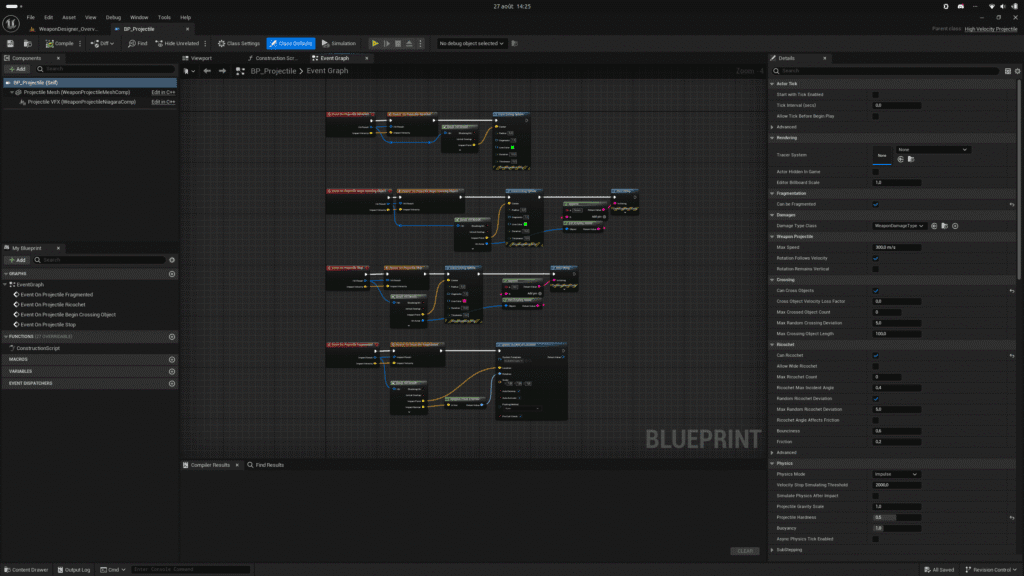
HOW TO CREATE? #
From the content browser, use the context menu (right-click) to select Weapon Projectile from the Projectile sub-category in Weapon Designer category.
HOW TO CONFIGURE? #
- Select the damage type class.
- Setup projectile abilities (Crossing, ricochet, fragmentation).
- Setup physics properties.
- Setup collision properties.
- Set the actor lifetime (Max lifetime, delay before destroy)
- Optional: Select a static mesh for your projectile. In most cases, this component is not seen by the player if the projectile velocity is high. In this case, you can leave them blank.
- Optional: Select a Niagara System for your projectile. Due to high velocity of the projectile, it can be hard to see the particle effect. You should use complex setup or Spawn Per Unit emitter.
TRACER #
The High Velocity Projectile class includes a fairly simple tracer system that allows you to see a projectile’s trajectory. It works very well with high-velocity projectiles but does not support changes in the projectile’s velocity (ricochets, crossings, etc.). The High Velocity Projectile class modifies the values of two variables:
- User.Trigger: This is a boolean that indicates when the effect should be activated.
- User.ImpactPositions: This is a vector array that allows you to define the positions of the impact points.
As for the Niagara system, you can study the NS_ProjectileTrace asset in the example included with the plugin.
FRAGMENTATION #
The projectile may fragment if its velocity is high enough and if the surface’s resistance is greater than that of the projectile. If this is the case, the “On Projectile Fragmented” event is triggered, and you can create whatever behavior or effect you want.
DAMAGE TYPE #
The Weapon Damage Type class contains all the data and functions needed to inflict damage and other effects on actors hit by the projectile.
CROSSING #
The projectile can penetrate thin surfaces or surfaces with low resistance if its velocity is high enough. You can adjust the settings for the projectile and the surface’s physics material to influence the projectile’s trajectory or control the conditions under which this event occurs. You don’t need a complex setup; simply add a physics material of the “Weapon Designer Physical Material” type to the world’s actors.
RICOCHET #
The projectile can bounce off a surface. You can adjust the settings on the projectile and on the surface’s physics material to influence the projectile’s trajectory or control the conditions under which this event occurs. You don’t need a complex setup; simply add a “Weapon Designer Physical Material” to the world’s actors.
POOLING SYSTEM #
If this projectile is created using the Weapon subsystem, it automatically uses the pooling system. This system helps optimize in-game performance and memory usage. More info about Pooling System here.
HOMING PROJECTILE #
This feature allows you to direct the projectile towards a target. You must specify the target in the weapon. More info about Homing Projectile.
LIFETIME #
The projectile’s lifespan is managed automatically if the projectile is launched from the Weapon Ranged class. Weapon Designer uses a pooling system that improves performance, reduces memory usage, and minimizes calls to the garbage collector, which can cause the game to freeze. It is important to define the maximum lifespan of a projectile, and it is strongly recommended to keep it as short as possible. You can adjust the delay before the projectile is placed in the pool if you have a specific use case.
EVENT #
- On Projectile Ricochet : Called when projectile ricochet on surface.
- On Projectile Begin Crossing Object : Called when the projectile passes through a surface.
- On Projectile End Crossing Object : Called when the projectile leaves a surface it has just crossed.
- On Projectile Stop : Called when projectile has come to a stop (velocity is below simulation threshold, bounces are disabled, or it is forcibly stopped).
- On Physics Volume Changed : Called when projectile enters in new physics volume.
DEBUG #
Debug features let you verify whether the projectile’s behavior matches what you want. You can display the projectile’s trajectory, its position at each frame, and the various impact points. Warning! The Unreal Engine doesn’t handle rendering a large amount of debug data very well. If your weapon has a high rate of fire, you may notice a significant drop in frame rate.


