
Due to the way the projectile physics simulation works, you cannot use the built-in engine volume triggers. This class was created to allow you to trigger an event if the projectile enters and leaves a volume [Sphere, Box, Capsule]. You will also have the possibility of influencing the simulation of the projectile by modifying its velocity or time dilation, for example.
HOW TO CREATE? #
From the content browser, use the context menu (right-click) to select Projectile Trigger Box, Projectile Trigger Sphere or Projectile Trigger Capsule from the Volume sub-category in Weapon Designer category.
HOW TO CONFIGURE? #
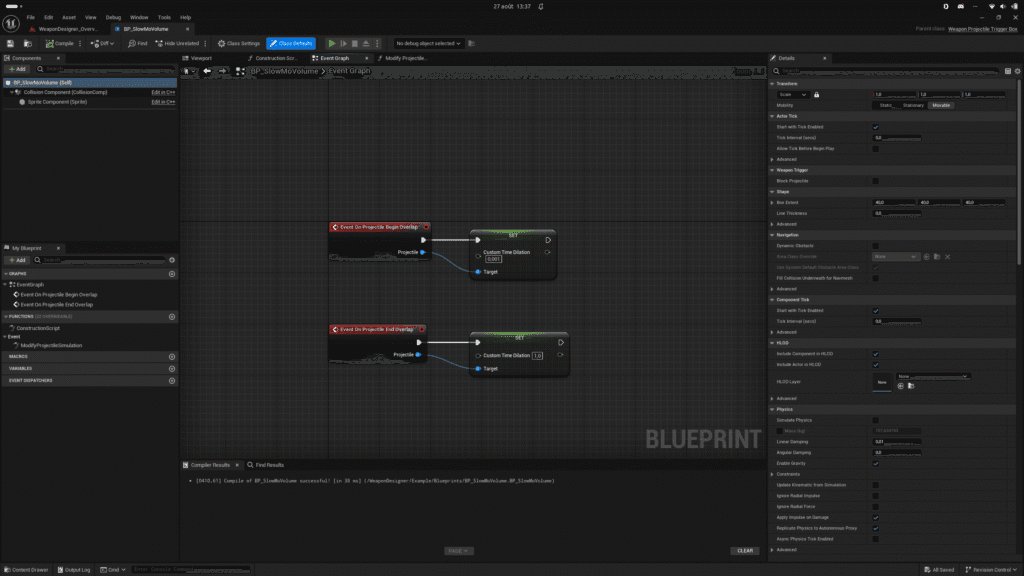
- Override On Projectile Begin Overlap and/or On Projectile End Overlap.
- Override Modify Projectile Simulation if needed.
MODIFY PROJECTILE SIMULATION #
Quick access to the projectile’s actor as well as its velocity. This function is only called once when the projectile enters the volume. You must return its new velocity.
EXAMPLE #
I use this volume for a localized slow motion effect on the projectile.


